Complete On-Page SEO Guide For Beginners In 2026
Search Engine Optimization (SEO) is one of the most important skills if you want your website to get free traffic from Google. Many beginners spend hours writing blog posts, but they still don't get enough visitors because they don't know how to optimize their pages correctly.
This is where On-Page SEO becomes important.
On-Page SEO is not difficult, but it can feel confusing when you see too many technical terms and complicated SEO guides. The truth is that anyone can learn it when everything is explained in a simple and practical way.
That is exactly what this guide will do. In this complete guide, we will learn On-Page SEO step by step using simple English, practical examples, and easy explanations. Even if you are completely new to blogging or SEO, you should be able to follow along without feeling lost or overwhelmed.
We have divided this guide into two important parts. Part 1 will help you understand the fundamentals of On-Page SEO, while Part 2 will show you how to apply those concepts when creating and optimizing your own webpages. Both parts are connected, so I recommend reading them in order.
By the time you finish all five parts, you will know how to optimize your blog posts and website pages so they become easier for Google to understand and more useful for your visitors.
Please don't skip any part. Every section teaches something important. If you miss even one part, you may not fully understand how On-Page SEO works because every lesson is connected to the next one.
Here is what we will learn together.
By the time you finish both parts, you will understand how Google discovers and understands webpages, what makes a page SEO-friendly, and how to optimize your own blog posts before publishing them.
Please don't skip Part 1 or Part 2.Each part teaches something important. When you understand the basics first, the practical optimization steps in Part 2 become much easier to follow.
Here is what we will learn together:
Part 1 – Understanding On-Page SEO Fundamentals
Part 2 – Optimizing Page Structure
We will keep the guide focused on the things beginners actually need to know instead of filling it with unnecessary technical information. So, let's begin with the foundation of On-Page SEO and learn everything step by step.
(Part 1)– Understanding On-Page SEO Fundamentals
Before you learn how to optimize a page, you first need to understand what On-Page SEO actually is and why it matters.
Think of this part as building the foundation of a house.
If the foundation is strong, everything built on top of it will also be strong. The same idea applies to SEO.
Once you understand these basics, every advanced SEO strategy will become much easier to learn.
1. What Is On-Page SEO?
Definition
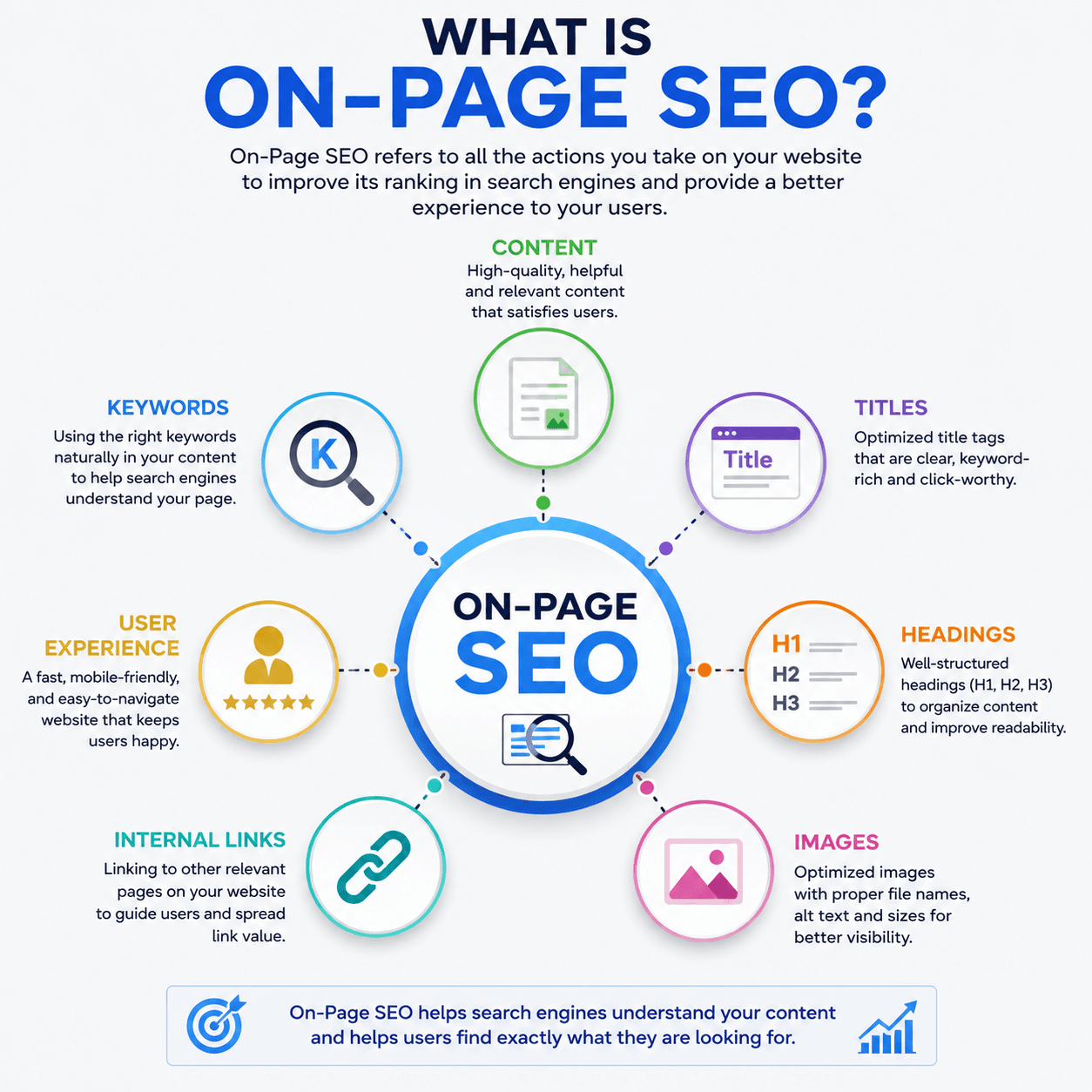
On-Page SEO is the process of improving everything inside a webpage so that search engines can understand it better and users can enjoy reading it.
It includes writing high-quality content, using the right keywords naturally, creating helpful headings, adding optimized images, improving page structure, and making the page easy to read.
Simply put... On-Page SEO means making your webpage better for both Google and your visitors.
Google wants to recommend pages that provide useful information and a good reading experience. When your page is clear, organized, and helpful, Google can understand it more easily.
That increases your chances of appearing higher in search results.
Example
Suppose someone searches:
"Best Budget Laptop For Students"
Google will look for pages that:
The page that does these things well has a much better chance of ranking higher.
Why On-Page SEO Matters
Writing a blog post is only the first step. If your page is not optimized, Google may not fully understand what your content is about. Even great articles can remain invisible if important On-Page SEO elements are missing.
Good On-Page SEO helps Google understand:
At the same time, it also helps your visitors. A well-optimized page is easier to read, easier to navigate, and more enjoyable to use. When users stay longer, interact with your content, and find answers quickly, it sends positive signals that your page provides value.
On-Page SEO vs Off-Page SEO
Many beginners think all SEO is the same. Actually, SEO has different parts.
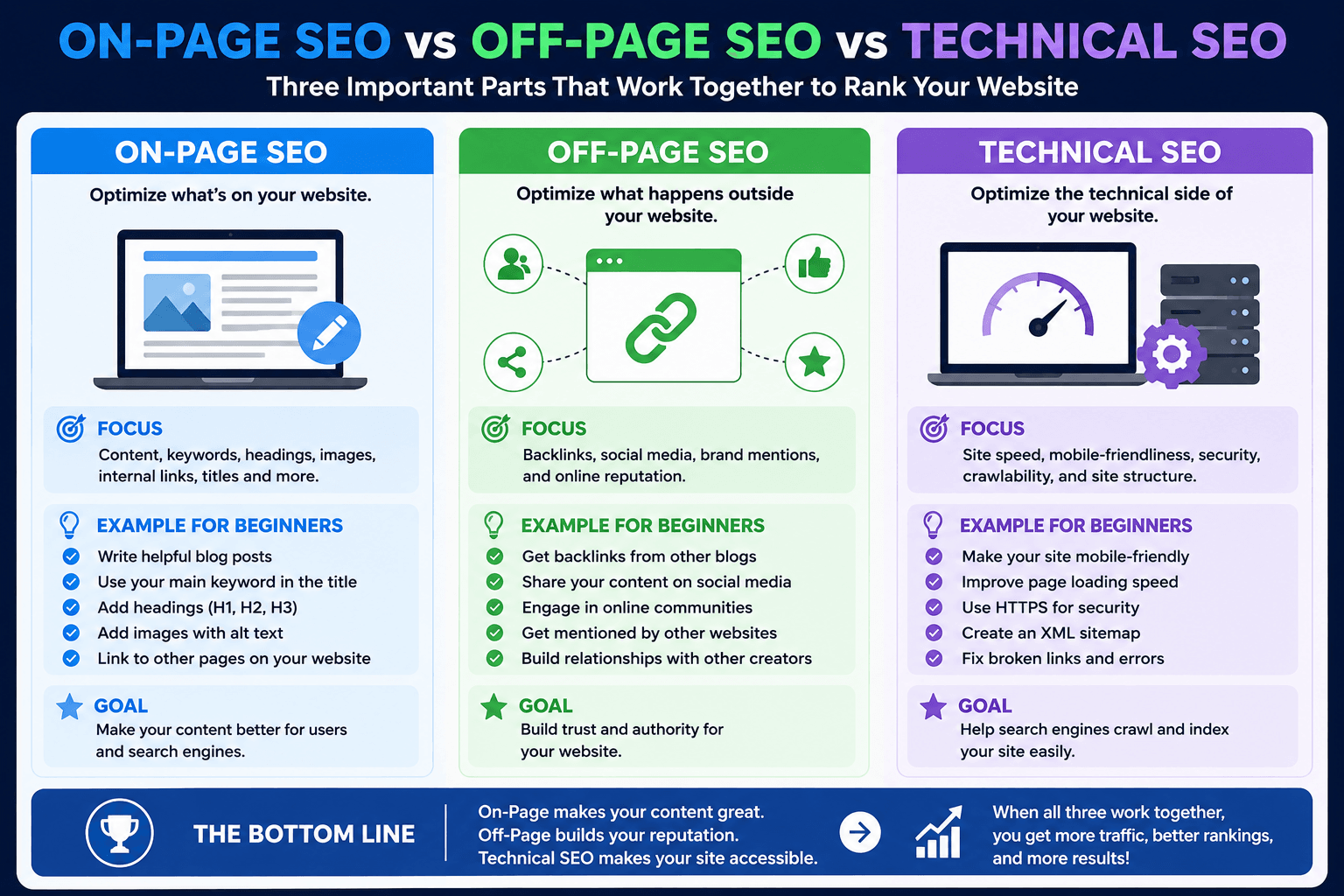
On-Page SEO focuses on everything you can control inside your website.
Examples include:
Off-Page SEO focuses on improving your website's reputation outside your website.
Examples include:
An easy way to remember it is this: On-Page SEO builds your content. Off-Page SEO builds your website's reputation.
Both are important, but beginners should first master On-Page SEO because it is completely under their control.
On-Page SEO vs Technical SEO
Another common confusion is between On-Page SEO and Technical SEO. They work together but have different purposes.
On-Page SEO improves the content that users read.
Technical SEO improves how search engines access and process your website.
Technical SEO includes things like:
You don't need to become a technical expert before learning On-Page SEO.
Start with optimizing your content first. Later, you can improve the technical side of your website.
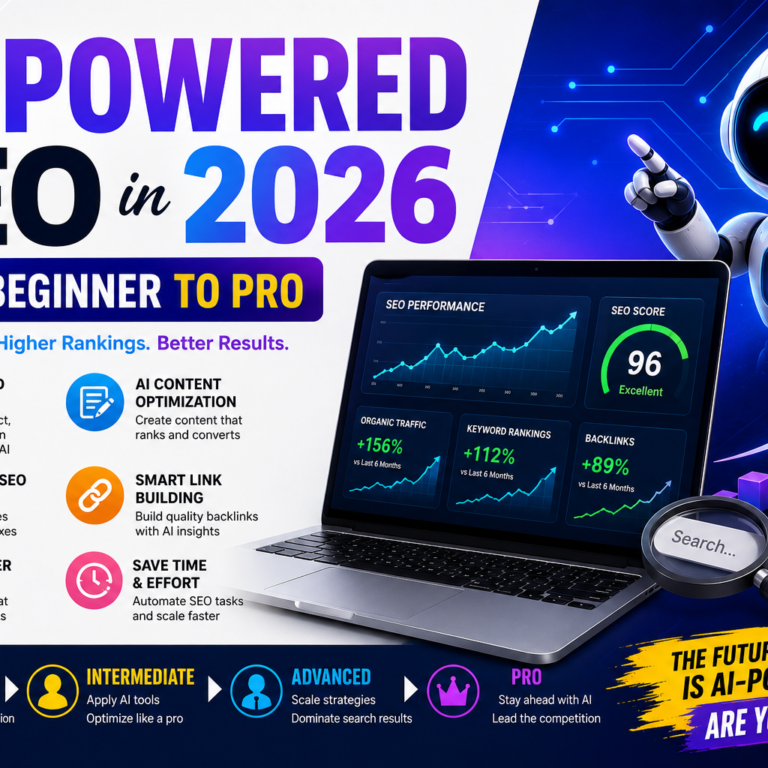
AI-Powered SEO In 2026: From Beginner To Pro
How Google Uses On-Page Signals
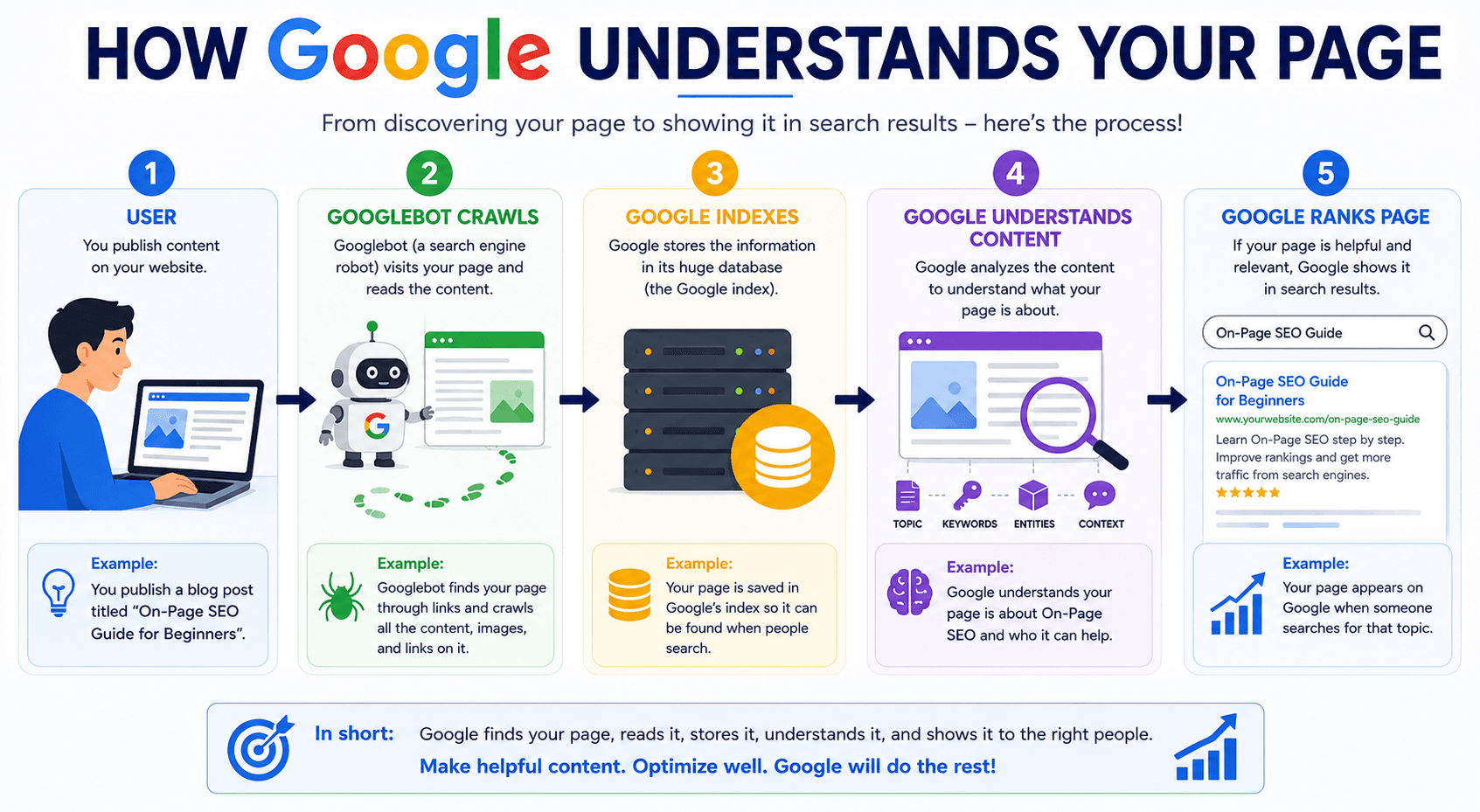
Google cannot read a webpage the same way humans do. Instead, it analyzes many different signals to understand what your page is about.
Some important On-Page signals include:
Google combines all these signals to decide where your page should appear in search results. The clearer your page is, the easier it becomes for Google to understand it.
Benefits of Good On-Page SEO
Learning On-Page SEO provides long-term benefits.
Some of the biggest advantages include:
Remember, good SEO is not about tricking Google. It is about creating pages that genuinely help people.
Common Beginner Mistakes
Almost every beginner makes a few SEO mistakes. The good news is that they are easy to fix once you know them.
Some common mistakes include:
Why Most Beginner Bloggers Fail In 2026
Avoiding these mistakes can already improve your website compared to many beginner blogs.
2. How Search Engines Understand Your Page
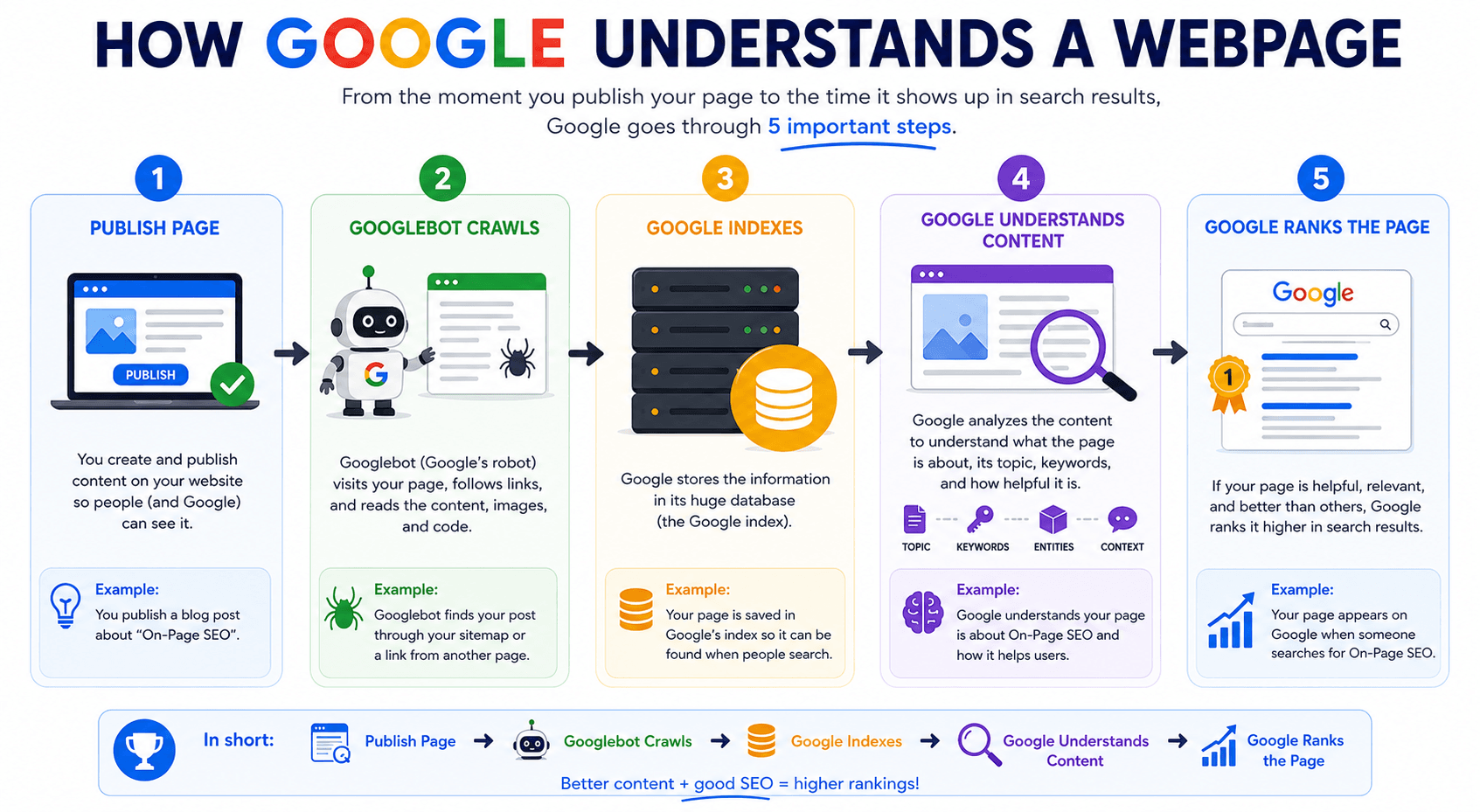
Now that you understand what On-Page SEO is, let's learn how search engines like Google actually find and understand your webpage.
Many beginners think that as soon as they publish a blog post, Google automatically knows everything about it. In reality, that is not how it works.
Google follows a process before deciding whether your page should appear in search results.You can think of it like a teacher checking exam papers.
First, the teacher collects the papers. Then, the teacher reads them carefully. Finally, the teacher gives marks based on the quality of each answer.
Google follows a similar process.
Before your page can rank, it usually goes through these important steps:
Besides these steps, Google also looks at how people interact with your page. This includes user experience and whether your content matches what people are searching for.
Let's understand each step one by one.
Crawling
The first step is called Crawling.
Crawling simply means that Google is discovering your webpage. Google uses automated programs called Googlebot or Google Crawlers. These bots continuously travel across billions of webpages on the internet, looking for new pages and updated content.
Whenever you publish a new blog post, Google doesn't know about it immediately. Its crawler first needs to visit your website and find the new page.
The crawler discovers pages in different ways, such as:
You can imagine Googlebot as a librarian walking through a huge library and searching for new books.
If your new book is placed on the shelf correctly, the librarian can easily find it.If it is hidden somewhere without any label or direction, it may take much longer to discover.
The same thing happens with your website.
When your pages are properly connected with internal links and included in your sitemap, Google can crawl them much more easily.
That is one reason why website structure is so important for SEO.
Related Reading: Want to understand how Google uses AI to discover and rank content?
Read our AI-Powered SEO In 2026: From Beginner To Pro guide.
Indexing
After Google finds your page, the next step is Indexing.
This is where Google reads your content and tries to understand what your page is about.
It looks at many different elements, including:
Google then stores this information in its massive database, which is called the Google Index.
Think of the Google Index as one of the world's largest digital libraries.
Every indexed webpage becomes part of this library. When someone searches for information, Google searches inside this library instead of searching the entire internet in real time.
However, not every crawled page gets indexed. If a page has very little useful information, copied content, technical problems, or poor quality, Google may decide not to include it in the index.
That is why creating helpful and original content is always important.
Simply publishing a page does not guarantee that Google will index it. Your page needs to provide value.
Ranking
Once a page is indexed, it becomes eligible to appear in Google Search. This is where the third step begins. It is called Ranking.
When someone searches for a keyword, Google looks through its index and tries to find the pages that best answer the user's question.
Google compares many pages before deciding which ones should appear first.
It looks at hundreds of ranking signals, including:
The goal is simple. Google wants to show the most useful page for every search.
For example, if someone searches for "How to Start a Blog in 2026," Google will compare thousands of similar articles.
The pages that are clear, detailed, trustworthy, and easy to understand usually have a better chance of ranking higher.
This is why writing helpful content is much more important than trying to trick search engines.
Google keeps improving its algorithms to reward pages that genuinely help people.
Related Reading: Ranking is not only about keywords. Your writing quality also matters. Learn how to create SEO-friendly articles in our How To Write SEO Blog Posts That Rank In 2026 guide.
User Experience Signals
Good SEO is not only about keywords. Google also pays attention to how visitors interact with your page.
This is known as User Experience, often called UX.
Imagine you click on a blog post. If the page loads quickly, the text is easy to read, the headings are clear, and you quickly find the answer you were looking for, you are likely to stay on that page longer.
Now imagine another page that is slow, full of advertisements, difficult to read, and confusing.
Most people would leave within a few seconds. Which page do you think provides the better experience?
Obviously, the first one. That is exactly what Google wants to encourage.
Some factors that improve user experience include:
Good user experience keeps visitors happy, and happy visitors are more likely to spend time on your website, explore other pages, and come back again.
Always remember that SEO is not just about search engines. It is equally about making your website enjoyable for real people.
Search Intent
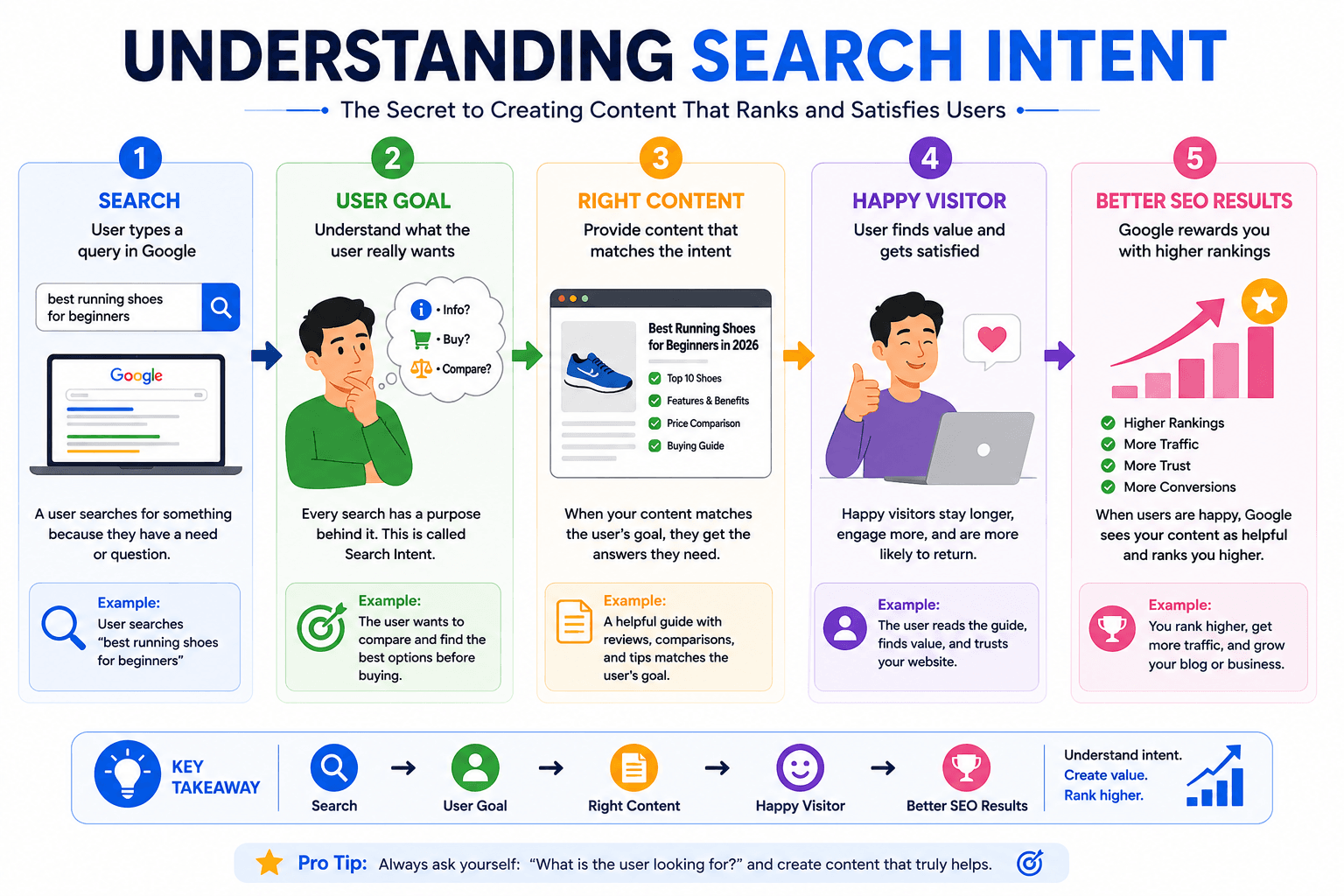
One of the biggest SEO concepts every beginner should understand is Search Intent.
Search intent simply means the reason behind a user's search.
People search Google because they want something.
Sometimes they want information.
Sometimes they want to buy a product.
Sometimes they want to compare options.
Sometimes they want to visit a specific website.
Your content should match what people actually expect to find.
For example, if someone searches for: "How to Bake a Chocolate Cake" They are looking for a step-by-step recipe. If your page only talks about the history of chocolate cakes without explaining how to bake one, it probably won't satisfy the reader.
On the other hand, a page that provides ingredients, instructions, baking tips, and pictures is much more likely to meet the user's expectations.
When your content answers the exact question people are asking, both your readers and Google are more likely to appreciate it.
Before writing any article, always ask yourself one simple question: "What does the person searching this keyword really want to know?" If you can answer that question clearly and completely, you are already moving in the right direction.
Related Reading: Before writing any article, learn how to find the right keywords in our Keyword Research For Bloggers Using AI In 2026 guide.
Bringing Everything Together
Now you can see how Google understands every webpage.
It follows a simple process.
First, Google discovers your page through crawling. Next, it reads and stores your page during indexing. Finally, it compares your page with others and decides where it should appear in search results through ranking.
While doing this, Google also checks whether your page provides a good user experience and whether it satisfies the search intent behind the keyword.
Understanding this process makes the rest of On-Page SEO much easier. As we continue this guide, every optimization technique you learn will help Google crawl your pages more easily, understand your content more clearly, and improve your chances of ranking higher.
3. Essential On-Page SEO Elements Overview
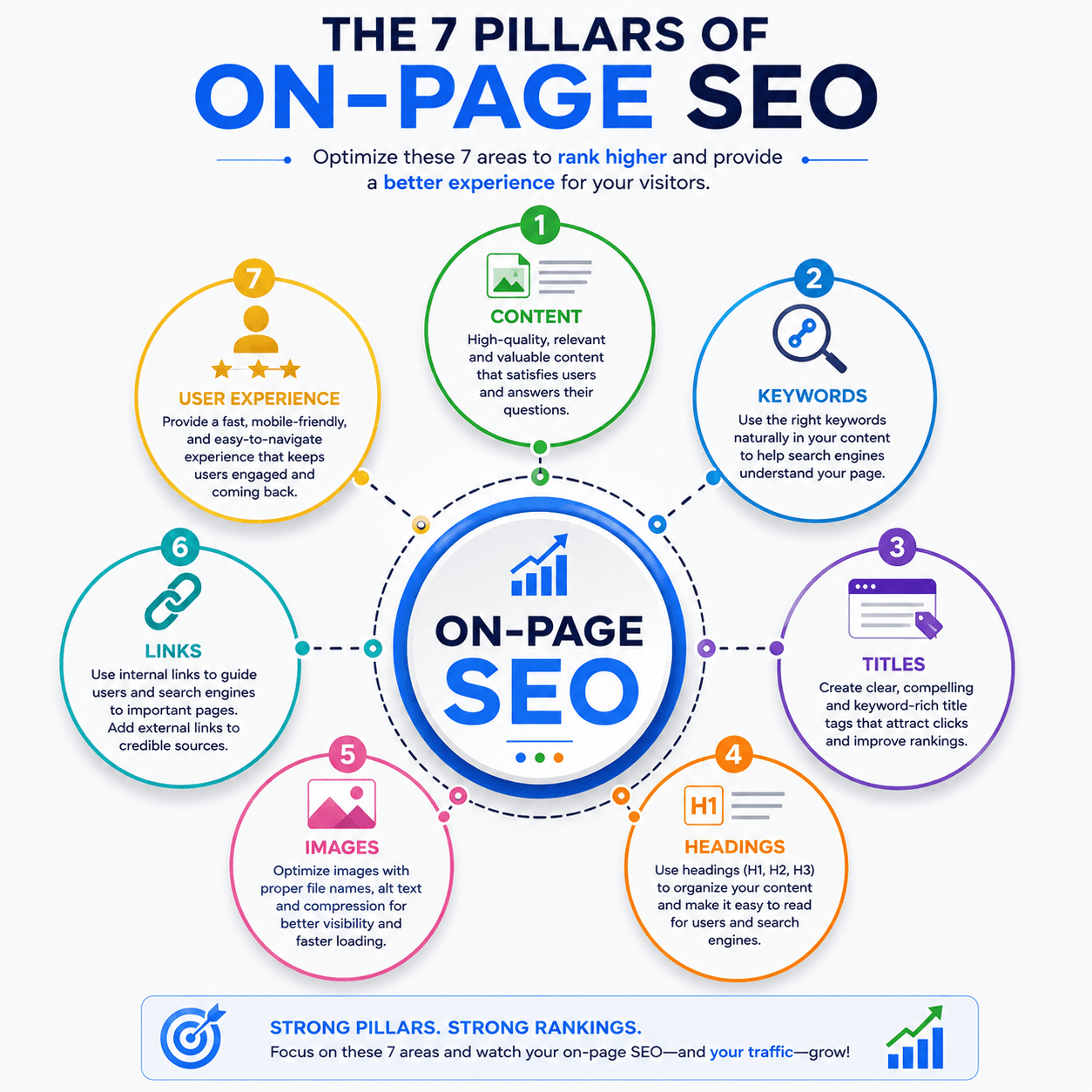
Now that you understand how Google finds, reads, and ranks a webpage, the next question is: What exactly should you optimize on your page?
This is where the main elements of On-Page SEO come into the picture. Think of your webpage like a house.
A strong house is not built with just one material. It needs a solid foundation, strong walls, a good roof, proper doors, and well-designed rooms. Every part has its own purpose, and together they create a complete home.
The same idea applies to On-Page SEO.
A well-optimized webpage is made up of several important elements that work together. If one element is weak, the overall performance of the page can also become weak. The good news is that you don't have to learn everything at once.
In the next parts of this guide, we will explore each element in detail.
For now, let's get a clear overview so you understand what each one does and why it is important.
Content
Content is the heart of every webpage. Without useful content, there is nothing for Google to understand and nothing valuable for visitors to read.
Whether you are writing a blog post, product page, service page, or landing page, your content should always focus on helping the reader. Instead of writing just to fill space, try to answer your reader's questions as clearly as possible.
Good content should be:
Always remember that Google wants to show pages that genuinely solve people's problems. If your content helps readers find the answers they need, you are already moving in the right direction.
As the saying goes, "Content is written for people first, and search engines second."
Keywords
Keywords are the words and phrases people type into Google when they are looking for information.
For example, if someone wants to learn SEO, they may search for:
These search terms are called keywords. When you naturally include relevant keywords in your content, Google gets a better understanding of what your page is about.
However, this does not mean you should repeat the same keyword over and over again. Years ago, some websites tried to rank by stuffing keywords everywhere. Today, Google is much smarter.
Instead of counting how many times a keyword appears, Google focuses on understanding the overall topic and whether the content is actually helpful.
The best approach is simple. Use your main keyword naturally, write like you're talking to a real person, and include related words where they fit naturally.
If your writing sounds natural to your readers, it usually sounds natural to Google too.
Titles
The page title is one of the first things both Google and users notice. It tells everyone what the page is about before they even open it. When someone searches on Google, the blue clickable headline they see is usually your SEO title.
Because of this, your title should be clear, interesting, and relevant to your topic.
A good title should:
Imagine you see these two titles.
Title 1: SEO Guide
Title 2: Complete On-Page SEO Guide for Beginners in 2026Which one gives you a better idea of what the article is about?Most people would choose the second one because it is more specific and helpful.
A good title creates a strong first impression, and first impressions matter.
In Part 2 of this guide, we'll learn exactly how to write SEO-friendly titles that attract both Google and readers.
Titles
Headings help organize your content into clear sections. Think of headings like signboards on a highway. Without signboards, travelers would easily get lost.
Similarly, without headings, readers may struggle to follow your article. Headings make long content easier to scan, easier to read, and easier to understand.
They also help Google recognize the main topics covered on your page.
A well-structured article usually includes:
Using headings properly improves both readability and SEO. It also encourages visitors to continue reading because the content feels organized instead of overwhelming.
Images
Images make your content more attractive and easier to understand. Sometimes a single image can explain an idea much faster than a long paragraph.
For example, an infographic showing the SEO process is often easier to understand than reading several pages of text. However, images are not only for decoration. They should also support your content.
Good image optimization includes:
Optimized images improve user experience and help search engines understand what your visuals represent. Throughout this guide, we'll also create simple infographics to explain important SEO concepts visually.
Links
Links connect your content together. They help both visitors and search engines discover more useful information. There are two main types of links you will use regularly.
Internal Links These connect one page of your website to another page on the same website.
For example, if this guide mentions keyword research, you can link it to your Keyword Research Guide.
Internal links help visitors continue learning and help Google discover more pages on your website.
External Links These point to trusted websites outside your own website. Sometimes linking to reliable sources can improve the usefulness and credibility of your content.
The goal is not to add as many links as possible. Instead, every link should have a clear purpose and provide additional value to the reader.
A good link should help someone learn something more, not distract them.
User Experience
The final element is User Experience, often called UX.
Even if your content is excellent, people may leave quickly if your page is difficult to use.Think about your own browsing habits.
If a website loads slowly, has tiny text, too many pop-ups, or confusing navigation, you probably won't stay there for long.
Your visitors feel the same way. A good user experience means your website is comfortable to read and easy to navigate.
Some important UX factors include:
When visitors enjoy using your website, they usually spend more time reading your content. This creates a better experience for users and sends positive signals to search engines.
Related Reading: Better user experience helps visitors stay longer and increases your chances of getting more organic traffic. Learn more in How To Get Your First 1,000 Blog Visitors In 2026.
Bringing Everything Together
Let's quickly review the seven essential elements of On-Page SEO. Each one has a different job, but together they create a webpage that is helpful, easy to understand, and optimized for search engines.
You don't have to master every element in one day. The purpose of this overview is to help you understand the complete picture. In the next parts of this guide, we will take each element one by one and learn exactly how to optimize it step by step with practical examples and beginner-friendly tips.
By the end of this course, these seven elements will become a natural part of every blog post and webpage you create.
What You Learned in Part 1
Congratulations! You have now completed the first part of the Complete On-Page SEO Guide.
In this part, you learned:
Now you have a strong foundation. In the next part, we'll start optimizing the actual structure of a webpage step by step.
Before the conclusion or "What's Next," add a Related Guides section.
📚 Related Beginner Guides
1. AI-Powered SEO In 2026: From Beginner To Pro
2. Keyword Research For Bloggers Using AI In 2026
3. How To Write SEO Blog Posts That Rank In 2026
4. How To Start A Profitable Blog In 2026 (Part 1)
5. How To Start A Profitable Blog In 2026 (Part 2)
6. How To Get Your First 1,000 Blog Visitors In 2026
7. Why Most Beginner Bloggers Fail In 2026
Frequently Asked Questions (FAQ)
What's Next?
Now that you understand the fundamentals of On-Page SEO, it's time to optimize the structure of your webpages.
In Part 2 – Optimizing Page Structure, you'll learn how to create SEO-friendly URLs, titles, meta descriptions, heading structures, and other important page elements that help both Google and your readers.
👉 Continue to Part 2 – Optimizing Page Structure