How To Start A Profitable Blog In 2026 (Part 2)

Congratulations! 🎉
You have now completed:
✅ Part 1: Beginner Setup Guide
✅ Part 2: SEO, Traffic & Monetization Guide
You now have the complete foundation needed to start and grow a profitable blog in 2026.
What Is SEO?
(Search Engine Optimization)
SEO, or Search Engine Optimization, is the process of improving your website so that search engines like Google can understand your content, trust it, and show it to people who are searching for related information. Every day, billions of searches are performed on Google. Users type questions, problems, and topics they want answers to, and Google's goal is to provide the most relevant and useful results. SEO helps your website become one of those recommended results.
Think of SEO as a way of making your website easier to find. Imagine opening a bakery in a busy city. Even if you make the best cakes and pastries, customers won't visit if they don't know your bakery exists. You need a good location, a clear signboard, and positive reviews so people can discover your business. In the online world, SEO plays the same role. It helps your website appear in front of potential visitors when they search for information related to your content.
Search engines use automated programs called crawlers or bots to scan websites across the internet. These crawlers analyze your pages, understand what your content is about, and store that information in Google's index. When someone performs a search, Google's algorithm evaluates millions of pages and ranks them based on factors such as relevance, quality, user experience, authority, and trustworthiness. Websites that provide the best answers generally receive higher rankings.
One of the biggest advantages of SEO is that it generates organic traffic. Organic traffic means visitors come to your website naturally through search results without you paying for each click. Unlike paid advertising, where traffic stops when you stop spending money, SEO can continue bringing visitors for months or even years after content is published. This makes SEO one of the most cost-effective digital marketing strategies available.
For example, imagine you write a detailed blog post titled "How to Start a Blog in 2026." If your article is comprehensive, well-structured, and optimized for search engines, Google may rank it on the first page of search results when users search for that topic. As more people click your article, you gain visitors, build authority, and potentially earn revenue through ads, affiliate marketing, digital products, or services.
SEO is not about tricking Google. Modern SEO focuses on creating valuable content that genuinely helps users. When you consistently publish useful information, improve website performance, use relevant keywords naturally, and provide a good user experience, search engines are more likely to reward your website with better visibility.
In simple terms, SEO helps connect people who are looking for information with websites that provide the best answers. It increases visibility, attracts free traffic, builds trust, and creates long-term growth opportunities for bloggers, businesses, and content creators.
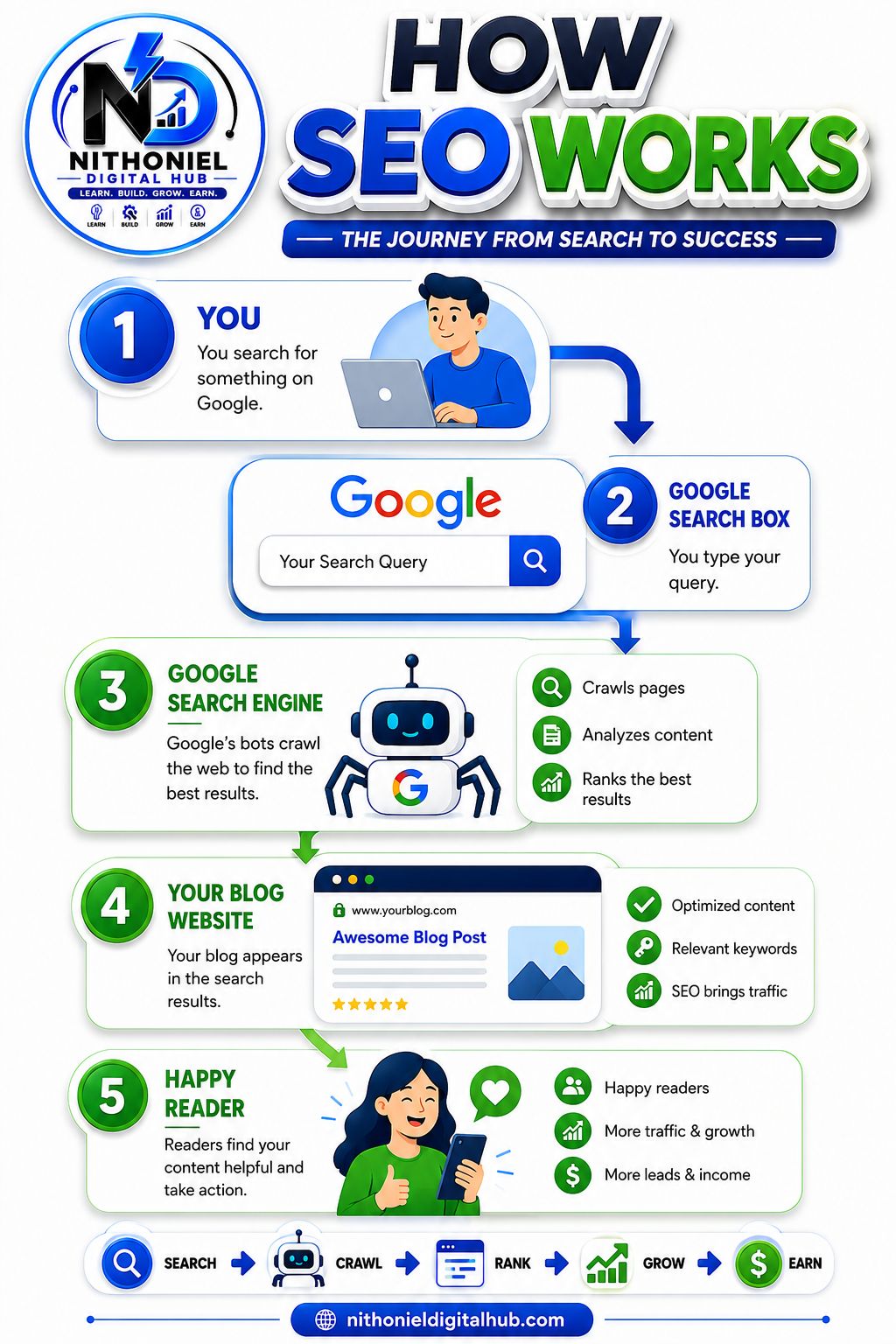
SEO Process Flow :
👤 Person Searches a Question
⬇️
🔍 Google Search Box
⬇️
🤖 Google Search Engine & Crawlers Analyze Content
⬇️
🌐 Your Blog Website Appears in Results
⬇️
😊 Happy Reader Gets the Answer
⬇️
📈 More Traffic, Growth, and Revenue
2. How Google Works
Google is the world's largest search engine, processing billions of searches every day. Its primary goal is simple: provide users with the most accurate, useful, and trustworthy answers to their questions as quickly as possible. To achieve this, Google relies on sophisticated algorithms and automated programs known as crawlers, spiders, or bots. These bots constantly travel across the internet, discovering new websites, updating existing information, and analyzing content to understand what each page is about.
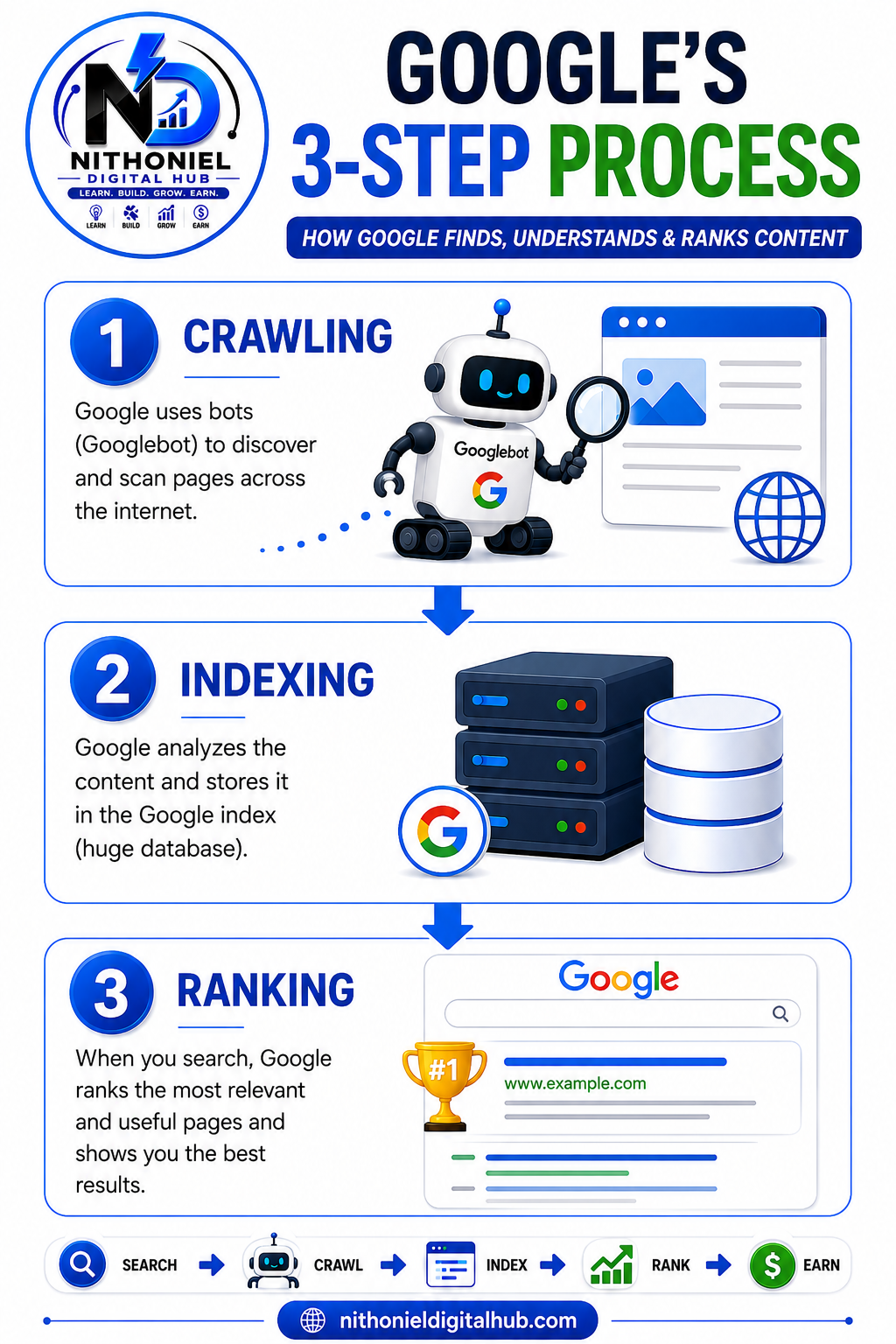
Whenever you publish a new blog post or webpage, Google doesn't instantly know it exists. Instead, Google's bots must first find your page, read its content, and determine whether it deserves to appear in search results. This process happens through three important stages: Crawling, Indexing, and Ranking.
Step 1: Crawling
Crawling is the discovery phase. Google uses automated bots, often called Googlebot, to scan websites across the internet. These bots follow links from one page to another, much like a person browsing websites.
When Googlebot visits your website, it reads your content, images, headings, internal links, and other important elements. The goal is to understand what your page is about and whether it contains valuable information for users.
If your website has a clear structure, fast loading speed, and proper internal linking, Google can crawl your pages more efficiently. Websites with broken links, technical issues, or poor navigation may be harder for Google to explore.
Example:
You publish a new article titled "How to Start a Blog in 2026". Googlebot discovers the page through your sitemap or an internal link and begins reading the content.
Step 2: Indexing
After Google crawls your page, it moves to the indexing stage. During indexing, Google analyzes the information collected from your page and stores it in its massive database known as the Google Index.
The index works like a giant digital library containing billions of web pages. Google categorizes and organizes content so it can quickly retrieve the most relevant pages whenever someone performs a search.
Google examines various elements during indexing, including:
1. Page topic
2. Keywords and phrases
3. Headings and structure
4. Images and alt text
5. Content quality
6. User experience signals
If Google determines that your page provides useful information and meets quality standards, it will be added to the index.
Example:
Google understands that your article is about blogging, website creation, and beginner blogging tips, then stores that information in its index.
Step 3: Ranking
Ranking is the most important stage. When a user searches for something on Google, the search engine looks through its index and decides which pages should appear first.
Google's algorithm evaluates hundreds of ranking factors, including:
1. Content relevance
2. Search intent match
3. Website authority
4. Backlinks
5. User experience
6. Mobile friendliness
7. Page speed
8. Content quality
Google does not simply rank the newest website or the website with the most keywords. Instead, it tries to identify the page that provides the best answer to the user's question.
Pages that are comprehensive, trustworthy, well-structured, and helpful are more likely to appear higher in search results.
Example:
When someone searches "How to Start a Blog in 2026," Google compares thousands of articles and ranks the pages that provide the most useful and complete information.
Why Ranking Matters -
Most users click results that appear on the first page of Google. In fact, the top few results receive the majority of clicks and traffic. This is why SEO is so important. By creating high-quality content and following SEO best practices, you increase your chances of ranking higher and attracting more visitors.
Google's ultimate goal is user satisfaction. If your content solves problems, answers questions clearly, and provides a great experience, Google is more likely to recommend your website.
Simple Summary
Google's Search Process
🌐 Website Published
⬇️
🤖 Crawling – Google discovers and reads your page
⬇️
📚 Indexing – Google stores your page in its database
⬇️
🔍 User Searches on Google
⬇️
🏆 Ranking – Google selects the best pages to show first
⬇️
😊 User Finds the Answer
The better your content helps users, the higher your chances of appearing in Google's search results and receiving free organic traffic.
3. Keyword Research
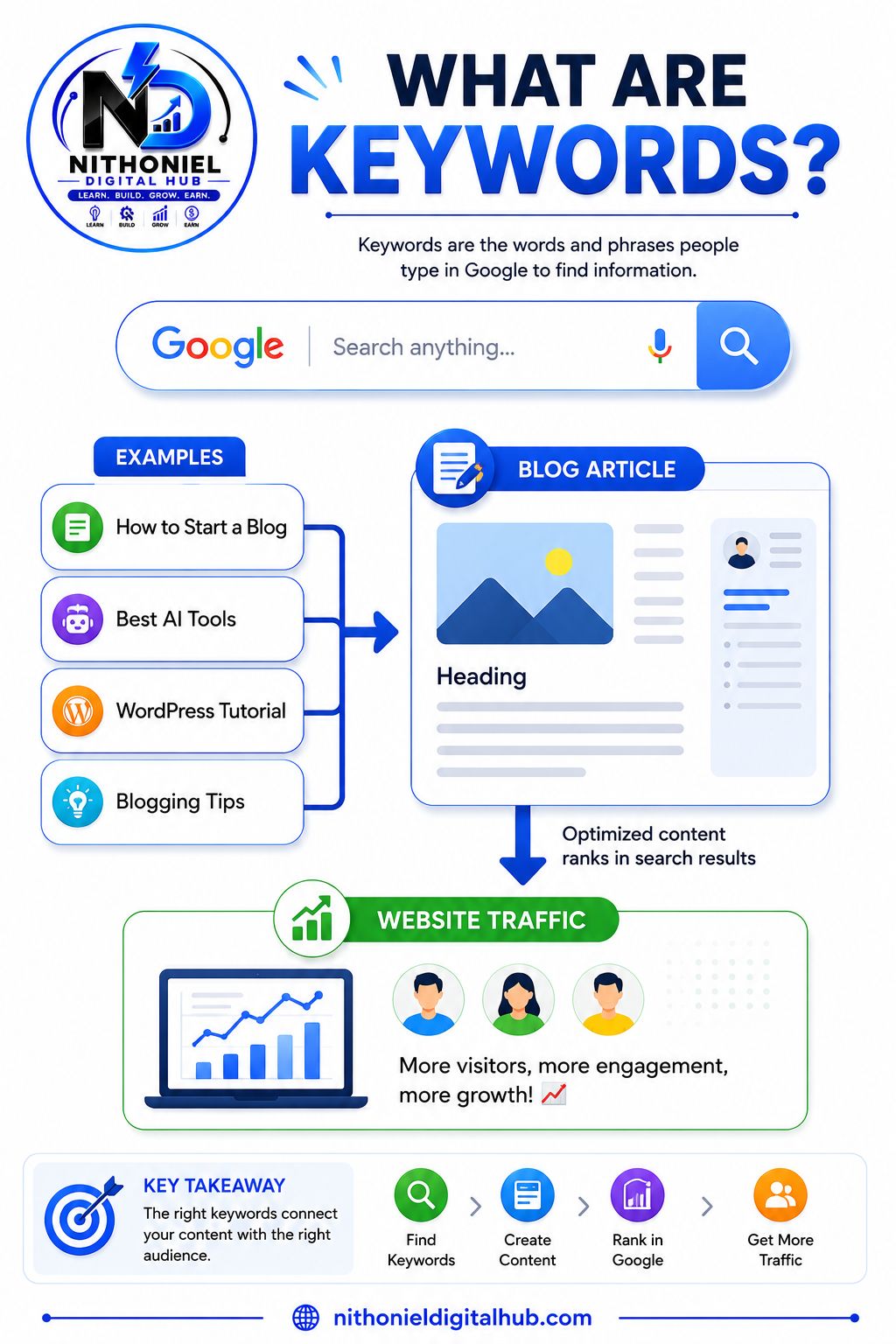
Keyword research is the process of finding the words and phrases that people type into search engines like Google when looking for information, products, or solutions. These words and phrases are called keywords, and they play a critical role in SEO because they help search engines understand what your content is about and who should see it.
Think of keywords as a bridge connecting your content to your audience. When someone has a question or problem, they usually start by searching on Google. If your article contains the same keywords and provides valuable answers, Google is more likely to show your page in the search results. Without keywords, it becomes difficult for search engines to determine the purpose of your content and match it with user searches.
For bloggers, keyword research is one of the most important steps before writing an article. Instead of guessing what people want to read, keyword research allows you to discover real search terms that users are actively searching for. This helps you create content that has a higher chance of attracting visitors from search engines.
For example, a beginner interested in blogging might search for:
1. How to start a blog
2. Blogging for beginners
3. Best blogging platform
4. How bloggers make money
5. Blogging tips for beginners
6. Best niche for blogging
Each of these searches represents a specific need or question. If you create detailed articles targeting these keywords, Google can connect your content with users who are looking for exactly that information.
Why Keyword Research Matters -
Many new bloggers make the mistake of writing about broad topics without researching keywords. While broad topics may seem attractive, they are often highly competitive and difficult to rank for.
Keyword research helps you:
When you know the right keywords, you can focus your efforts on topics that have the potential to bring consistent visitors to your website.
4. Types of Keywords
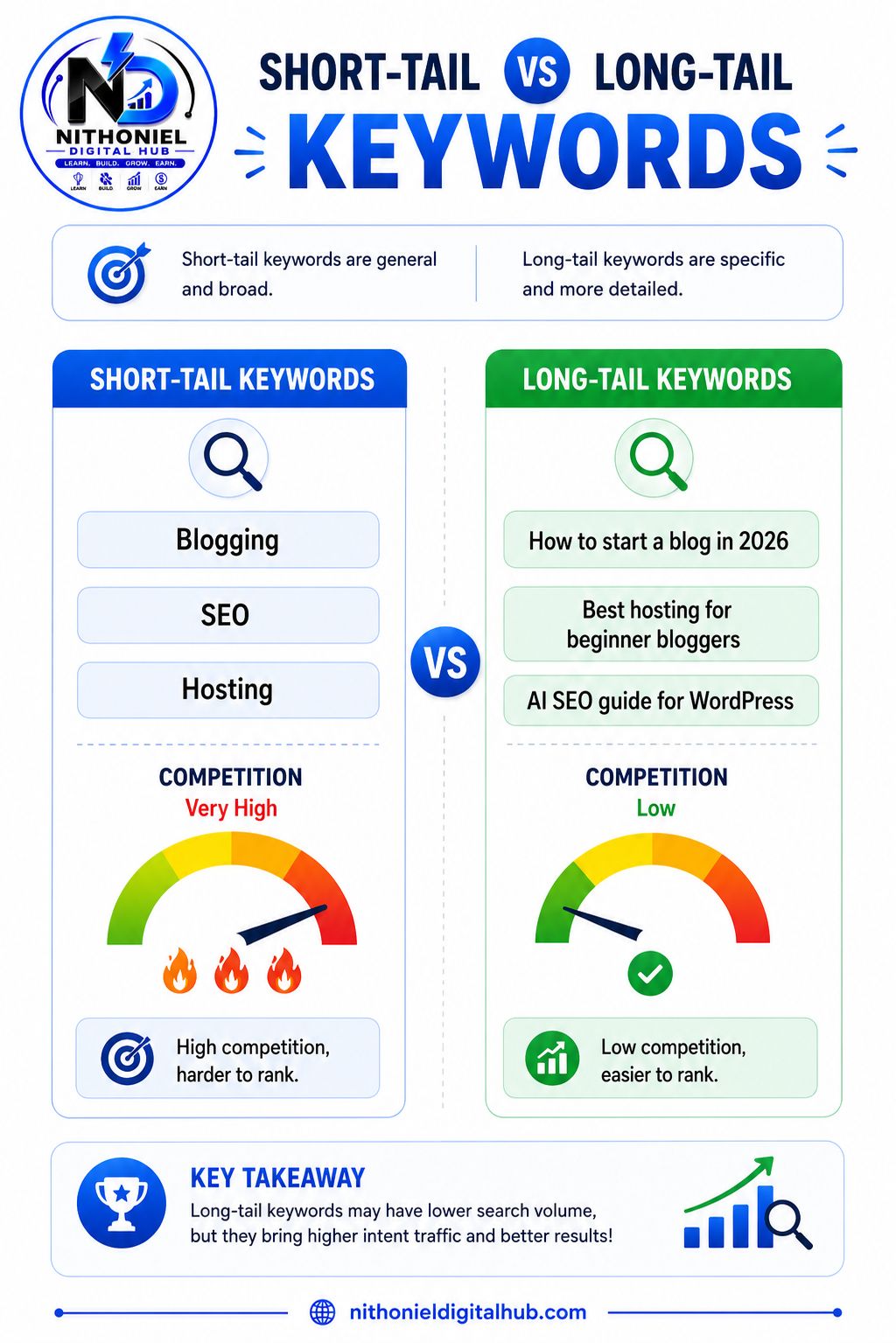
Keywords generally fall into two categories:
Short-Tail Keywords
These are broad and highly competitive keywords.
Characteristics of Short-Tail Keywords
✅ High search volume
✅ Broad search intent
✅ High competition
✅ Difficult for beginners to rank
✅ Often dominated by large websites
Examples:
Because the intent is unclear, Google has many possible results to choose from.
Although they may receive thousands of searches, ranking for them is extremely difficult because many large websites already dominate these terms.
Long-Tail Keywords
These are longer, more specific search phrases.
Characteristics of Long-Tail Keywords
✅ Lower competition
✅ More specific search intent
✅ Easier to rank for
✅ Higher conversion potential
✅ Ideal for new websites and bloggers
Examples:
Long-tail keywords usually have lower competition and attract visitors who are searching for something specific. Because of this, they are often easier to rank for and can generate highly targeted traffic.
Example
❌ Bad Topic
Technology
This topic is too broad. Google doesn't know exactly what aspect of technology you are covering, and you'll be competing against major websites.
✅ Better Keyword
Best AI Tools for Beginner Bloggers in 2026
This keyword is specific, targeted, and clearly shows user intent. Someone searching for this phrase knows exactly what they want, making it easier for Google to match your content with the right audience.
Why Long-Tail Keywords Are Better for Beginners
Imagine two bloggers start a new website.
Blogger A Targets:
"Blogging"
Competition: Extremely High
Chance of Ranking Quickly: Very Low
Blogger B Targets:
"How to Start a Profitable Blog in 2026 for Beginners"
Competition: Lower
Chance of Ranking Quickly: Much Higher
The second blogger has a better opportunity to appear in search results because fewer websites are targeting that exact phrase.
As your website grows and gains authority, you can gradually target more competitive keywords. Most successful blogs begin by focusing on hundreds of long-tail keywords and then expand into broader topics over time.
5. Free Keyword Research Tools
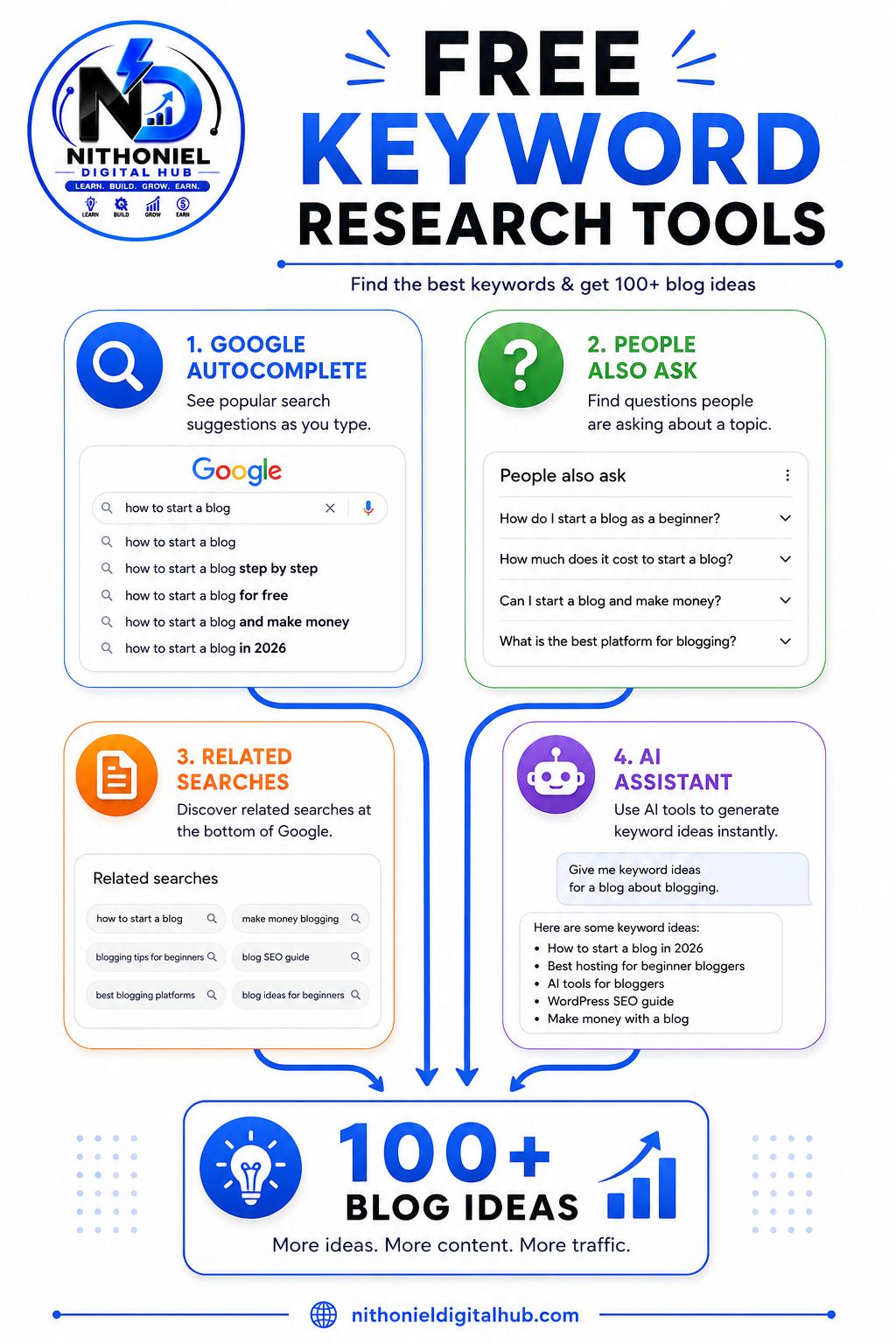
One of the biggest misconceptions about SEO is that you need expensive keyword research software to find good keywords. While premium tools can provide additional data, they are not necessary when you're just starting a blog. In fact, many successful bloggers begin with completely free tools and still generate thousands of visitors from search engines.
The key is understanding where your audience is searching and using free resources to discover the exact questions, problems, and topics people are interested in. By combining several free keyword research methods, you can uncover hundreds of content ideas without spending any money.
1. Google Autocomplete
2. People Also Ask
3. Related Searches
4. ChatGPT
By combining Google Autocomplete, People Also Ask, Related Searches, and ChatGPT, you can discover hundreds of valuable keyword ideas without spending any money. These free tools provide everything a beginner blogger needs to start building SEO-friendly content.
6. Understanding Search Intent
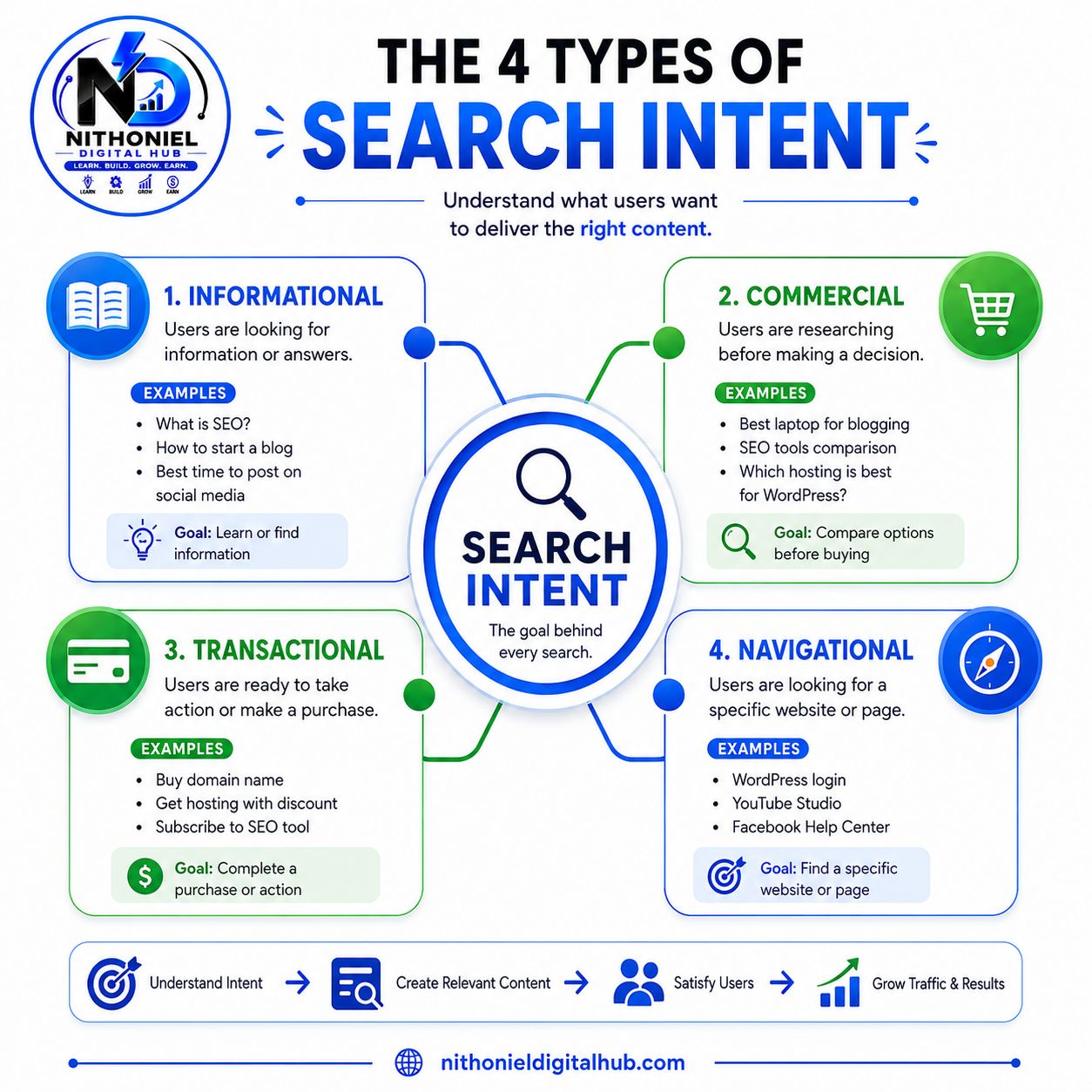
One of the most important concepts in SEO is Search Intent. Search intent refers to the reason behind a user's search query. In simple terms, it answers the question:
"Why is someone searching for this?"
Every time a person types something into Google, they have a specific goal. They may want to learn something, compare products, make a purchase, or visit a particular website. Google's primary mission is to understand that goal and provide the most relevant results possible.
This means that ranking on Google is not just about using keywords. Your content must also match what users are expecting to find. Even if you write a detailed and well-optimized article, it may struggle to rank if it does not satisfy the searcher's intent.
For example, if someone searches for "Best Web Hosting for Bloggers," they likely want a comparison of hosting providers, not a tutorial on how hosting works. If your content doesn't match that expectation, Google may choose another page that better satisfies the user's needs.
Understanding search intent allows you to create content that aligns with what users want, which improves rankings, increases engagement, and helps build trust with your audience.
Why Search Intent Matters
Google has become very sophisticated at understanding user behavior. The search engine analyzes which pages users click, how long they stay, and whether they find the information useful.
if users quickly leave your page and return to Google because they didn't find what they wanted, Google may see this as a signal that your content doesn't satisfy the search intent.
When your content matches search intent:
✅ Users stay longer on your website
✅ Bounce rates decrease
✅ Engagement increases
✅ Google gains confidence in your content
✅ Rankings improve over time
The Four Types of Search Intent
Before creating content, it's important to understand search intent, which is the reason behind a user's search. Google aims to show the most relevant results based on what the user wants to achieve. Most searches fall into four main categories: Informational, Commercial, Transactional, and Navigational Intent.
1. Informational Intent
Informational intent occurs when users want to learn something or find answers to a question. They are looking for information, guides, tutorials, or explanations rather than trying to buy a product. Searches such as "What is SEO?", "How to start a blog", or "How WordPress works" are informational because the user wants knowledge. Educational articles, step-by-step guides, and tutorials work best for this type of search.
2. Commercial Intent
Commercial intent occurs when users are researching products or services before making a purchase. They are comparing options and looking for recommendations, reviews, or comparisons to help them make a decision. Examples include "Best web hosting for bloggers", "Best AI writing tools", or "Bluehost vs Hostinger". Content such as product reviews, comparison articles, and buying guides is ideal for commercial-intent searches.
3. Transactional Intent
Transactional intent indicates that a user is ready to take action, usually by making a purchase or signing up for a service. These users have already completed their research and are prepared to buy. Examples include "Buy web hosting", "Purchase domain name", or "Sign up for SEO software". Landing pages, product pages, and sales pages are the most effective content types for transactional searches.
4. Navigational Intent
Navigational intent occurs when users want to visit a specific website, page, or platform. They already know where they want to go and use Google as a shortcut. Examples include "WordPress login", "Gmail sign in", or "YouTube Studio". In these cases, users expect Google to direct them to the exact website or page they are looking for.
Search Intent and SEO Success
Many websites fail to rank because they focus only on keywords and ignore search intent. Successful SEO requires both.
Think of it this way:
Keyword = What users search for
Search Intent = Why they search for it
When you understand both, you can create content that satisfies users and aligns with Google's goals.
Search intent is the reason behind every Google search. Before writing any article, ask yourself what the user truly wants to achieve. Whether they are looking for information, comparing products, ready to buy, or trying to visit a specific website, your content should match that intent. When your content satisfies user expectations, Google is more likely to rank it higher, resulting in better visibility, more traffic, and long-term SEO success.
7. How to Write an SEO-Friendly Article
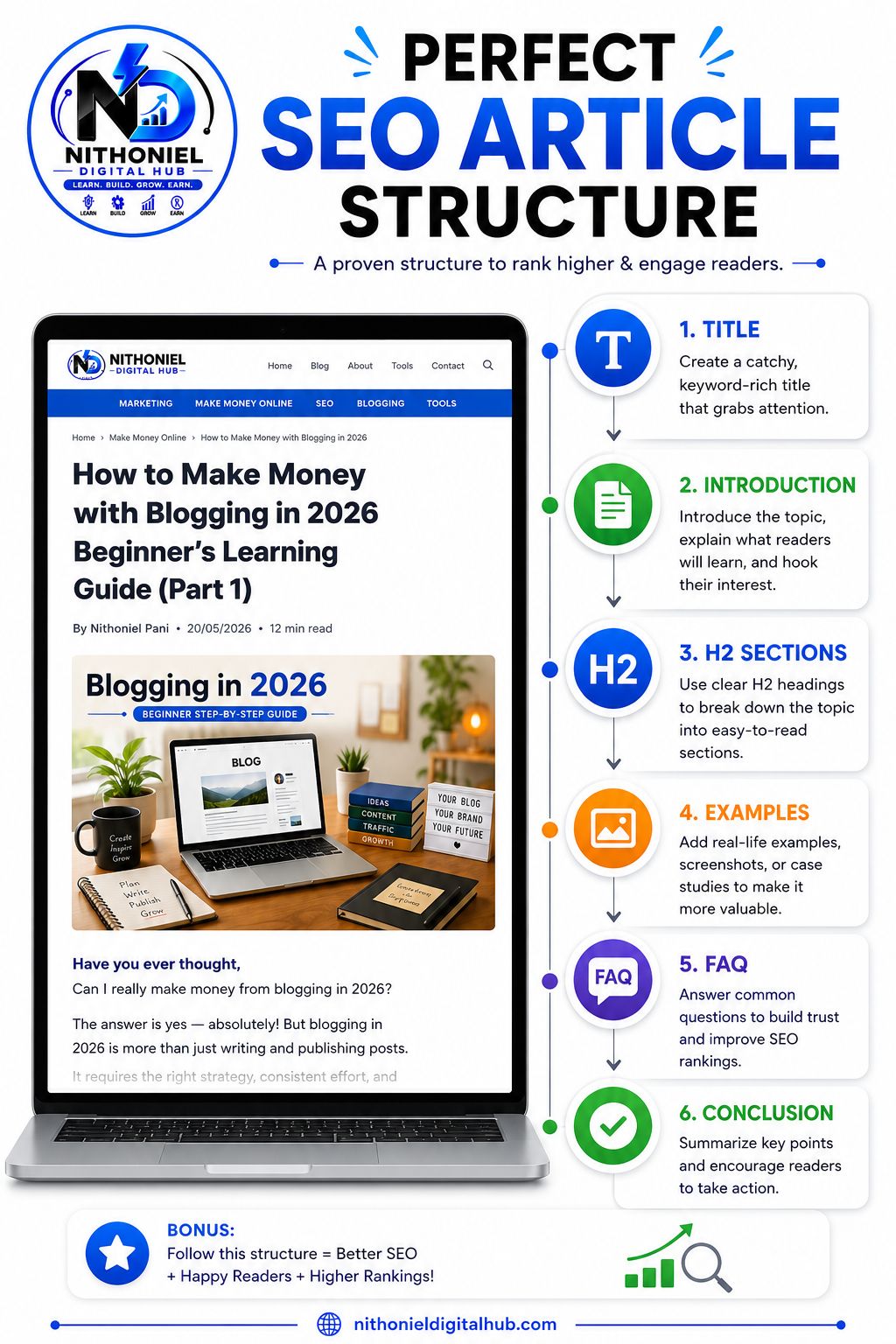
Writing an SEO-friendly article is about much more than simply adding keywords to a page. The goal is to create content that is easy for both readers and search engines to understand. A well-structured article improves readability, keeps visitors engaged, and helps Google determine what your content is about.
When users visit a webpage, they usually scan the content before deciding whether to read it. If they see huge paragraphs, poor formatting, or confusing layouts, they may leave the page quickly. Search engines notice this behavior and may rank the page lower over time. On the other hand, content that is organized, easy to read, and valuable to users often performs better in search results.
The best SEO articles are structured logically, answer user questions clearly, and provide a positive reading experience from start to finish.
Why Article Structure Matters
A good article structure helps both readers and search engines understand your content more easily. When people visit your blog, they want information quickly and clearly. If your article is organized properly, readers can find answers faster and stay on your website longer. Google also prefers well-structured content because it can better understand the topic and relationship between different sections. This improves the chances of ranking higher in search results.
Benefits for Readers
✅ Easier to read
✅ Faster to find information
✅ Better user experience
✅ More engaging content
Benefits for Google
✅ Understands your topic better
✅ Identifies important sections
✅ Improves content relevance
✅ Helps with rankings
Simply put, the easier your content is to read, the better it performs.
Basic SEO Article Structure
Every SEO-friendly article should follow a simple flow. Start with a clear title that tells readers what the article is about. Next, write an introduction that explains the topic and what readers will learn. After that, cover the main topic in detail and break it into smaller subtopics using headings. Include examples wherever possible because examples make information easier to understand. Add a Frequently Asked Questions section to answer common doubts and finish with a conclusion that summarizes the article and encourages readers to take action.
Most successful blog posts follow a simple structure:
Title
A clear headline that tells readers what the article is about.
Introduction
Explain the topic and what readers will learn.
Main Topic
Cover the main subject in detail.
Subtopics
Break the topic into smaller sections using headings.
Examples
Use examples to make concepts easier to understand.
Frequently Asked Questions
Answer common questions readers may have.
Conclusion
Summarize the article and encourage readers to take action.
This structure keeps your content organized and easy to follow.
Create a Strong Title
The title is the first thing people see when your article appears on Google. A good title should clearly explain the topic and naturally include your main keyword. For example, "How to Start a Blog in 2026" instantly tells readers what they will learn. A clear and specific title attracts more clicks and helps search engines understand your content.
Write an Engaging Introduction
The introduction should grab the reader's attention and explain why the topic is important. It should briefly describe the problem, introduce the solution, and tell readers what they can expect from the article. A strong introduction encourages visitors to continue reading and increases engagement.
Use Headings and Subheadings
Headings make your content easier to read because they divide information into smaller sections. Most readers scan an article before reading it fully, so headings help them find the information they need quickly. They also help Google understand the structure of your content and identify the most important topics.
Keep Paragraphs Short
Long paragraphs can make readers lose interest, especially on mobile devices. Short paragraphs are easier to read and help visitors stay focused. Try to keep paragraphs concise and explain one idea at a time. This improves readability and creates a better user experience.
Use Bullet Points and Lists
Bullet points help organize information and make important points stand out. Readers can quickly scan lists and understand key ideas without reading every sentence. Whenever you are explaining benefits, steps, features, or tips, bullet points make the content easier to follow.
Add Relevant Images
Images make articles more engaging and visually appealing. They help explain concepts, break up large sections of text, and keep readers interested. Screenshots, diagrams, charts, and infographics can improve understanding and increase the amount of time visitors spend on your page.
Include a FAQ Section
A Frequently Asked Questions section helps answer common questions readers may still have after reading the article. It improves user experience and can help your content appear in featured snippets on Google. FAQs also show search engines that your article covers the topic thoroughly.
Write a Strong Conclusion
The conclusion should briefly summarize the main points of the article and provide a clear next step for the reader. A good conclusion reinforces what readers have learned and encourages them to take action, whether that means starting a blog, learning SEO, or exploring another related topic.